Hi, I'm
Korel Ucpinar


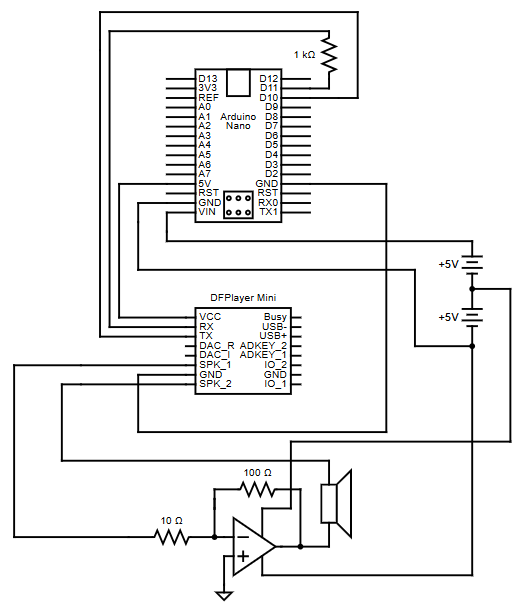
This diagram is for the circuit network of the portable arduino speaker
This Arduino-powered portable speaker is a self-contained, battery-operated audio device designed for
maximum portability and simplicity. It utilizes the
DFPlayer Mini
to play audio files directly from an SD card,
enabling automatic track looping. Powered by 6 AA-batteries, the speaker is easy to maintain, with quick and
convenient battery replacement.
The concept for this speaker originated from collaborative discussions with Jackson Bowles, Alex Anthony, and Brenden Mahoney
as a potential startup venture, where the idea evolved through brainstorming and feedback.



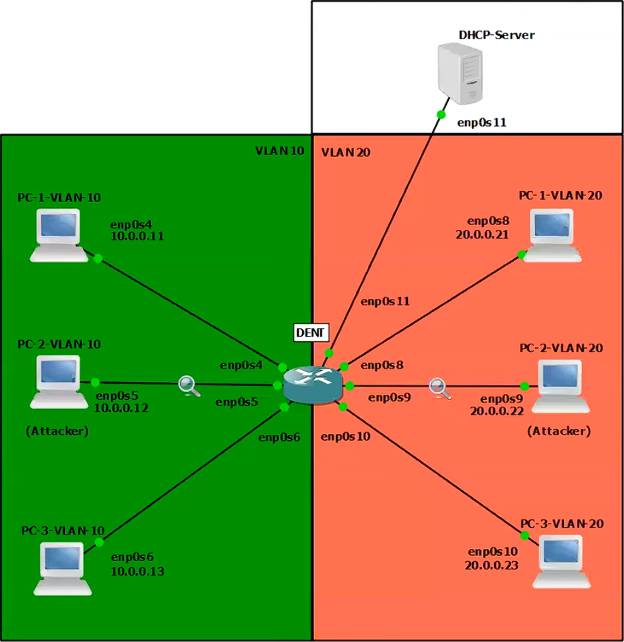
Screenshot of GNS3 Simulaiton where multiple PC's in different VLANs are connected to a switch running KDAI
The Address Resolution Protocol (ARP)
lacks built-in validation, making networks vulnerable to
ARP cache poisoning
and enabling man-in-the-middle or denial-of-service attacks. Enterprise-grade switches often offer
Dynamic ARP Inspection (DAI)
as a Layer 2 security feature to mitigate such risks.
However, Linux-based networking environments have lacked an equivalent - until now.
To fill this gap KDAI (Kernel Dynamic ARP Inspection), a Linux kernel module, was developed to implement DAI.
KDAI is a Loadable Kernel Module (LKM) for Linux systems that enhances Layer 2 network security by preventing ARP cache poisoning.
It operates by intercepting ARP messages traversing a Linux bridge and comparing ARP entries against a trusted database of IP-to-Mac address bindings.
This database is built dynamically using
DHCP Snooping
but may also be populated using static ARP entries.
Key Features:
- ARP Inspection: Logs and drops ARP packets with mismatched IP-to-MAC bindings to prevent ARP spoofing.
- DHCP Snooping: Builds a dynamic table by monitoring DHCP traffic to ensure valid IP-to-MAC bindings.
- Static ARP ACLs: Allows manual configuration of trusted IP-to-MAC bindings.
- Interface Trust: Interfaces can be marked as trusted (bypass checks) or untrusted (ARP inspection required).
- ARP Rate Limiting: Limits ARP packets to 15 per second on untrusted interfaces to prevent flooding.
- Per-VLAN Support: Applies rules independently to each VLAN for more granular control.



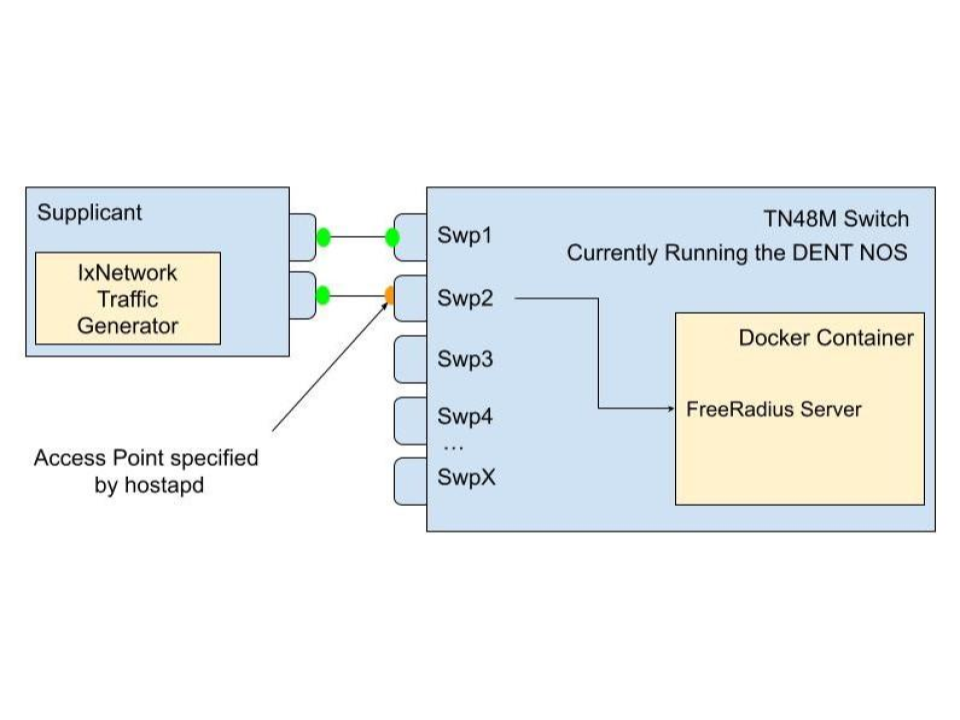
Diagram of a supplicant connecting to an access point on an authenticator, which forwards authentication requests to a FreeRadius server running in a Docker container
This project simplifies the setup of
IEEE 802.1X authentication by containerizing the
RADIUS server
into a docker image and using
hostapd
and
FreeRADIUS
to manage network access. When run on a device, the image configures it
as both an authenticator and an authentication server, allowing it to handle incoming EAPOL
frames from supplicants (devices seeking network access).
The device acts as an access point, blocking all non-EAP traffic until the authentication process completes.
It forwards EAP messages to the internal RADIUS server for credential validation. Once validated, the RADIUS server
sends either an Access-Accept or Access-Reject message, controlling whether the port is opened for normal traffic or
kept locked.
This setup lets administrators easily replicate the entire 802.1X handshake-including EAP-Start, identity exchange,
RADIUS challenges, and authorization-without complex configuration. The use of hostapd for access point functionality
and FreeRADIUS for credential checking makes it a powerful, flexible solution for network access control.



As the VP of Teaching and Mentoring for CENG, I trained volunteers to teach elementary and middle school students
how to program in Scratch, Java, and Python. Through effective mentoring and a structured curriculum,
I maintained an impressive 92% student retention rate year after year, impacting approximately 300 children annually
from 2019 to 2023.
If you are intrested in getting involved with CENG please visit some of the ICONS on this conatiner.
Regular expressions (regex) are patterns used to search, match, and manipulate text.
They allow you to describe rules for text in a concise way, making them useful for tasks
like validating input, searching logs, extracting data, or performing find-and-replace operations.
Using Regex in Python: Python provides the "re" module for working with regex.
import re
pattern = r"\d+"
text = "There are 24 apples"
match = re.search(pattern, text)
if match:
print("Found:", match.group())
For hands-on practice, I highly recommend the interactive exercises on RegexOne.
They provide clear explanations and progressively challenging problems to make learning regex easier.
Understanding how and where the CPU begins is crucial for low-level programming and OS design. The following is a simple
breakdown of that process.
Step 1 - CPU Startup: When powered on, a CPU (Intel, AMD, etc.) immediately begins executing
instructions at a fixed reset vector (e.g., 0xFFFF0).
Step 2 - Firmware Mapping: BIOS/UEFI manufacturers (AMI, Phoenix, etc.) write firmware that lives in
read-only memory (ROM/flash). Motherboard manufacturers wire the hardware so that this firmware is mapped to the
CPU's reset vector. This electrical mapping is what makes the firmware appear exactly where the CPU expects it
when the system powers on.
Step 3 - Hardware Initialization and Bootloader: Once running, the BIOS/UEFI firmware performs POST (Power-On Self-Test),
verifying that the CPU, RAM, storage devices, and essential motherboard components are present and functioning
correctly before searching for a bootable device.
Step 5 - Kernel Handoff: When found he bootloader loads the operating system kernel into RAM and jumps to its
entry point. At this moment, control transfers from firmware to the operating system, and the CPU begins executing
kernel code.
In modern IT environments, storage solutions are critical for data access, performance, and management.
Two common architectures are Network Attached Storage (NAS) and Storage Area Network (SAN).
While both provide centralized storage, they differ in how they serve data and how clients interact with it.
Network Attached Storage (NAS):
NAS is designed for file-level access. It serves files over a network to multiple users and devices.
It is ideal for shared file storage, backups, and collaborative environments.
NAS commonly uses NFS (Network File System), originally developed by Sun Microsystems, to allow clients to access files over the network.
Storage Area Network (SAN):
SAN works at the block level, providing clients with virtual disks called LUNs (Logical Unit Numbers).
Each LUN defines a virtual partition of a physical disk, giving clients more control over their storage.
SAN is typically used in environments that require high performance and scalable storage for databases, virtualization, and enterprise applications.
Connectivity Options for SAN:
iSCSI - Transfers block-level data over an existing IP network.
Pros: lower cost, uses existing infrastructure
Cons: slower than dedicated channels
Fibre Channel - Uses a dedicated network for high-speed block-level transfers.
Pros: high performance, low latency
Cons: higher cost, requires specialized hardware
Quick Comparison:
- NAS -> File-level access, simple setup, good for collaboration
- SAN -> Block-level access, high performance, suitable for enterprise applications
For deeper learning, check out SNIA SAN Resources and Red Hat NAS Guide.
If you have any questions, project ideas, or just want to say hello, feel free to reach out!
Email: [email protected]